Automated installation a lot of useful extra software on Ubuntu after the initial desktop install.
This program installs a collection of some of the best Ubuntu software and can be considered to be one of the top things to do after installing Ubuntu.
Selecting and Installing all the extra software on a new Ubuntu computer can be time consuming. I wanted to automate the process on new machines as well as simplify the installation for new users. All comments and improvements are very welcome as this is purely a personal project at this point and must be considered a work in progress.
The application will install the latest versions of all software listed below as well as add the required PPA's to keep the software up to date.
* Latest Update Apr 2021
Extra Software Installed:
|
Ubuntu Restricted Extras video and audio codecs |
|
Gnome Tweak Tool to tweak your desktop settings |
| Gnome Sushi to add spacebar instant preview of files |
| Numix Circle Icons to add style to your desktop |
| Variety is a feature rich wallpaper changer for Ubuntu |
| My Weather Indicator for local weather information |
|
Google Chrome is arguably the best browser available |
| Tor Browser for anonymous internet browsing |
| Geary for sending and receiving emails |
|
LibreOffice is the complete open source Office software replacement |
| Telegram Messenger for private messaging |
| Skype offers text, voice and video chat |
| DropBox will sync your DropBox cloud storage |
| VLC will play any video file you can imagine |
| KODI is a complete home media center experience |
| Lollypop for playing music files |
| Radio Tray will stream online radio to your desktop |
| Spotify for your music streaming needs |
| GIMP is powerful image editing software |
| Darktable allows photographers to process RAW files |
| Inkscape is vector based illustration and graphics editor |
| Scribus professional quality desktop publishing software |
| OpenShot is a great video editor ideal for most users |
| Kdenlive for more advanced video editing |
| Handbrake to convert DVD's and videos for mobile devices |
| Blender for 3D creations |
| Audacity for music and sound editing |
| OBS for open source broadcasting |
| Steam gaming platform for unlimited gaming joy on Linux |
| KeePass to store all your passwords securely |
| Shutter allows you to do easy screenshots |
| FileZilla for FTP file up- and downloads |
| BleachBit for secure file and history delete |
| Samba allows for windows network sharing |
| PDF Tools to merge, cut, append and edit PDF documents |
| p7zip adds the powerful 7zip file compression and decompression |
| Atom is a great code editor from GitHub |
| Sublime Text is a favourite code editor |
| Visual Studio Code is the popular code editor by Microsoft |
| Android Studio for Android Mobile Software Development |
For more information on these programs visit the software selection page.
Installation:
- OPTION 1: Add the Ubuntu After Install PPA to your software sources and install Ubuntu After Install. Open a terminal window and enter:
sudo add-apt-repository ppa:thefanclub/ubuntu-after-install
sudo apt-get update
sudo apt-get install ubuntu-after-install
- OPTION 2: Download the Ubuntu After Install application directly (download link at bottom of page). Double click on the downloaded .deb file to Install the application using the Ubuntu Software Center or manually with dpkg -i from the command line.
- Once installed search Ubuntu Dash for Ubuntu After install and start the application.
- Follow the on-screen instructions (see screenshots below)
Requirements:
- Ubuntu 12.04 - 21.04 Desktop installed.
- NOTE : With newer releases of Ubuntu some of the items might not be available yet and will not be installed. You can install these items later when newer versions are released.
Using Ubuntu After Install
- Start the application from the dash by searching for Ubuntu After Install.
- Follow the on screen instructions.

- Select the software you would like to install and click Install Now to begin.

- Once you have started the install process be very patient as the installation will take a while to complete.
- Once an application has been installed successfully it will be marked with green dot as shown below.
- If there is a problem with the install of an application, or if it is not available for your version of Ubuntu it will be marked with a red dot.
- It is not a good idea to stop or interrupt the install process once it has begun.
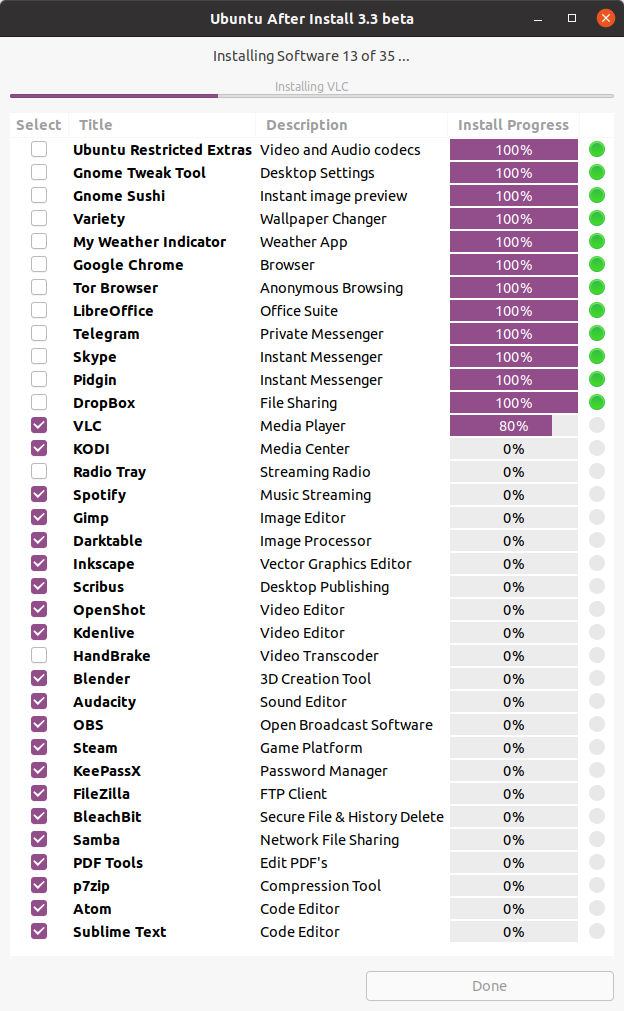
- Software that has already been installed will not be selected by default, but you can select these items to re-install or upgrade the software to the latest versions.
- Software marked with an orange dot will be re-installed / upgraded.

Download:
| Attachment | Size |
|---|---|
 Ubuntu-After-Install.deb | ver 3.5 | 32/64bit Ubuntu-After-Install.deb | ver 3.5 | 32/64bit | 28.04 KB |